
The Arduino Nano carries the same ATmega328P brain as the UNO, squeezed onto a board small enough to sit on a breadboard. That tiny footprint hides a few quirks that can ruin a wiring job if you assume it behaves exactly like its bigger sibling. Here is a fast tour of what each pin group does and where the Nano surprises people.
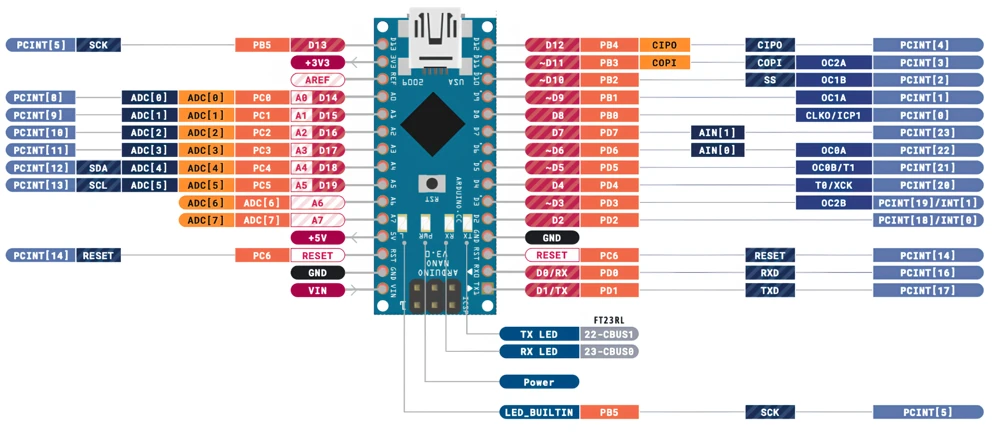
Read the full tutorial with diagrams and tables at controllerstech.com.
Powering the Board
- VIN accepts an unregulated supply, ideally 7 V to 12 V. Anything higher is simply burned off as heat in the regulator.
- The 5V pin offers a regulated rail for sensors, but motors need a separate supply.
- The 3.3V pin is weak, about 50 mA on the original board, and some clones omit it.
- Two GND pins are tied together, and every external module should share one.
Digital and PWM Pins
Fourteen digital pins (D0 to D13) handle HIGH and LOW signals. Six of them, D3, D5, D6, D9, D10 and D11, can also output PWM for dimming LEDs or controlling speed. D13 drives the onboard LED, which makes it perfect for a first blink test but a poor choice for a clean input. For instant reactions to a signal, D2 and D3 provide external interrupts.
Analog Inputs
Eight analog inputs (A0 to A7) feed a 10-bit converter that returns readings from 0 to 1023. A0 to A5 can double as digital pins. A6 and A7 are the surprise: they only read analog values, with no digital mode and no pull-up resistors. Using I2C also claims A4 and A5, so plan ahead.
Serial Communication
- UART: D0 (RX) and D1 (TX), shared with the USB connection.
- I2C: A4 (SDA) and A5 (SCL).
- SPI: D10 (SS), D11 (MOSI), D12 (MISO) and D13 (SCK).
Quick Rules to Remember
- Keep VIN between 7 V and 12 V.
- Never put more than 5 V on any pin.
- Unplug anything from D0 and D1 before uploading a sketch.
- Leave D10 as an output when the Nano is an SPI master, or it can drop into slave mode.
- A6 and A7 can never be used as digital pins.
- Put a 220 Ω to 330 Ω resistor in series with every LED.
- Drive motors through a transistor, MOSFET or relay module.
Read the Full Guide
This summary skips the timer pins, the ICSP header, the pin-by-pin reference tables and the full comparison with the UNO. For all of that, plus the complete diagram and sketch-ready details, read the original article: Arduino Nano Pinout: Complete Guide with Diagram.